---
title: Snowflake Schema
description: Discover how normalized dimensions impact performance in a snowflake schema and why they can lead to slower queries in data warehousing.
---
import { Aside, Steps } from "@astrojs/starlight/components";
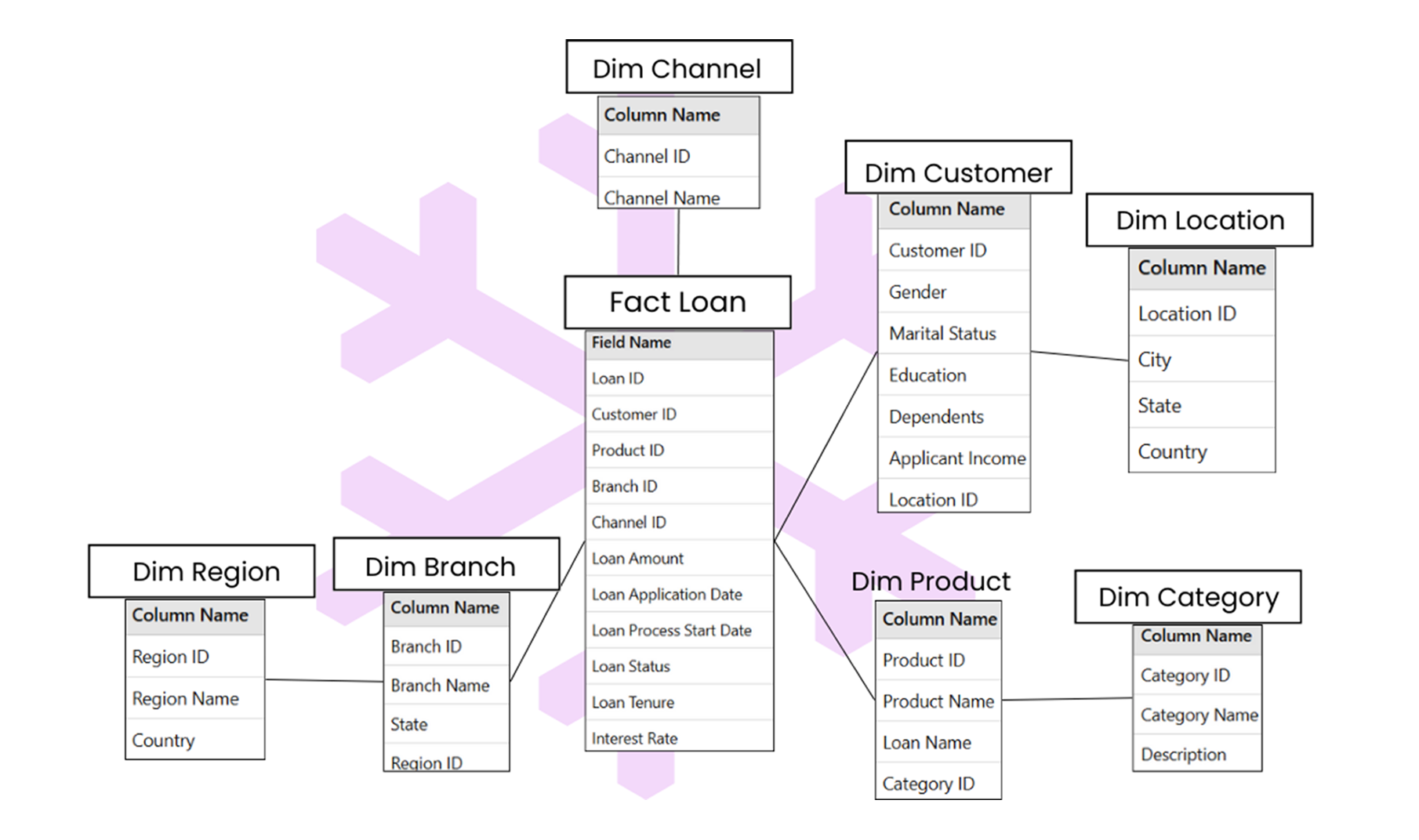
The snowflake schema is a more complex design where dimension tables are further normalized into smaller tables, forming a snowflake-like structure. Snowflake schema is preferred when managing large, complex datasets where consistency and storage efficiency are more critical.
## Key Components
- **Fact Table:** Similar to the star schema, it holds numerical data and keys to connect with dimension tables.
- **Normalized Dimension Tables:** Break down dimensions into multiple related tables, reducing redundancy and improving consistency.
## Characteristics
- Dimension tables are normalized, meaning attributes are divided into smaller, related tables.
- Requires more joins to retrieve data compared to the star schema.
## Advantages
- Saves storage space by reducing data duplication.
- Ensures data consistency, as changes are reflected across all related tables.
- Useful for managing large and complex datasets.
To create a snowflake schema, start with the same process as the star schema by defining the business process and identifying the metrics for your fact table. The fact table stores data like total sales or profit, along with foreign keys that connect to the dimensions.
Unlike the star schema, normalize the dimension tables by breaking them into smaller related tables. For example, a product dimension might have a main table with product ID and name and a separate table for categories or brands. Similarly, a customer dimension could include a table for customer details and another for regions.
## Difference Between Star Schema and Snowflake Schema
| Aspect | Star Schema | Snowflake Schema |
|--------------------|------------------------------------------------------|-------------------------------------------------------|
| **Design Structure** | Simple and flat structure with denormalized dimension tables. | Complex structure with normalized dimension tables. |
| **Dimension Tables** | Each dimension table contains all related attributes in one table. | Dimension tables are split into smaller related tables. |
| **Query Performance** | Faster due to fewer joins required for querying. | Slower due to multiple joins needed for querying. |
| **Ease of Use** | Easier to understand and use, especially for non-technical users. | More complex and requires technical expertise to query. |
| **Best For** | Small to medium-sized datasets and simpler analysis needs. | Large and complex datasets where consistency is important. |
| **Setup Complexity** | Simple to design and implement. | More time-consuming to design and implement due to normalization. |
| **Use Case** | Best for quick reporting and business intelligence dashboards. | Best for managing detailed, hierarchical, or complex datasets. |
Schemas define how data is organized in a warehouse. To make them work, we need to define relationships between tables, like one-to-one or one-to-many. In the next section, we will explore how these relationships form the foundation of data modelling.