
Creating ETL Workflow in Infoveave
Creating an ETL workflow in Infoveave is an intuitive process that allows you to extract, transform, and load data from diverse sources into a unified structure for reporting and analysis. Infoveave simplifies the integration of dynamic data, ensuring consistency and accuracy throughout the workflow. With powerful transformation tools and automation capabilities, Infoveave enables users to clean, standardize, and enrich data from multiple sources such as MySQL databases, FTP servers, or CSV files.
Let us now understand the sources
In this workflow, let us focus on three datasets — ABC Bank, Symmonds Agency, and PVR Consultancy — stored in different locations and formats. The transformation process will resolve common data issues such as inconsistent formats, missing values, duplicates, and special characters, ensuring the data is unified and available in the stage area. From there, we will load the data into dimension and fact tables, forming the foundation of a star schema that can be used for reporting and analytics. In the DWH we have 4 dimension tables as Dim_Customer, Dim_Channel, Dim_Product, and Dim_Branch, we also have the Fact_Loan table
To create an effective ETL workflow, it is crucial to understand the structure and challenges of the datasets.
ABC Bank Dataset
Schema for ABC Bank Dataset
| Column Name | Data Type | Description |
|---|---|---|
| Loan_ID | VARCHAR(15) | Unique identifier for the loan, with possible extra characters to be cleaned |
| Customer_ID | VARCHAR(10) | Unique identifier for the customer |
| Product_ID | VARCHAR(10) | Identifier for the product (e.g., PRD_A, PRD_F) |
| Branch_ID | VARCHAR(10) | Identifier for the branch |
| Loan_Amount | DECIMAL(15, 2) | Total amount of the loan |
| Loan_Term_Months | INTEGER | Loan tenure in months |
| Loan_Status | VARCHAR(20) | Current status of the loan (e.g., Approved, Pending, Rejected) |
| Interest_Amount | DECIMAL(15, 2) | Total interest charged for the loan |
| Repayment_Amount | DECIMAL(15, 2) | Total amount to be repaid by the borrower |
| EML_Amount | DECIMAL(15, 2) | Monthly installment amount |
| Revenue_Amount | DECIMAL(15, 2) | Revenue generated from the loan |
| Interest_Rate | DECIMAL(5, 2) | Interest rate applied to the loan |
| Channel_ID | VARCHAR(10) | Identifier for the channel through which the loan was processed |
| Loan_Application_Date | DATETIME | Date and time of loan application |
| Loan_Approval_Date | DATETIME | Date and time of loan approval |
| Channel_Name | VARCHAR(50) | Name of the channel (e.g., ABC Bank) |
| Product_Name | VARCHAR(100) | Name of the product (e.g., Capital Expenditure Loan) |
| Gender | VARCHAR(10) | Gender of the customer (e.g., Male, Female) |
| Marital_Status | VARCHAR(20) | Marital status of the customer (e.g., Single, Widowed, Divorced) |
| Education | VARCHAR(50) | Educational background of the customer (e.g., PhD, Undergraduate) |
| Customer_Name | VARCHAR(100) | Full name of the customer |
| Self_Employed | VARCHAR(3) | Indicates if the customer is self-employed (Yes/No) |
| Dependents | INTEGER | Number of dependents |
| Applicant_Income | DECIMAL(10, 2) | Monthly income of the loan applicant |
| Coapplicant_Income | DECIMAL(10, 2) | Monthly income of the co-applicant (if applicable) |
| Branch | VARCHAR(100) | Name of the branch where the loan was processed |
| State | VARCHAR(50) | State in which the branch is located |
| Latitude | DECIMAL(10, 6) | Latitude of the branch location |
| Longitude | DECIMAL(10, 6) | Longitude of the branch location |
Explanation of Schema
-
Identifiers:
- Loan_ID, Customer_ID, Product_ID, and Branch_ID serve as primary keys for their respective entities and ensure unique identification.
-
Loan Details:
- Loan_Amount, Loan_Term_Months, Loan_Status, Interest_Amount, Repayment_Amount, and EMI_Amount capture all key financial details about the loan.
-
Revenue Metrics:
- Revenue_Amount and Interest_Rate provide additional insights into profitability.
-
Channel and Product Information:
- Channel_ID and Channel_Name identify the channel through which the loan was processed, while Product_Name describes the product type.
-
Customer Demographics:
- Gender, Marital_Status, Education, Customer_Name, Self_Employed, and Dependents offer rich demographic information for customer profiling.
-
Income Details:
- Applicant_Income and Coapplicant_Income capture the financial strength of the borrower(s).
-
Branch Details:
- Branch, State, Latitude, and Longitude provide geographical and operational context for the branch managing the loan.
-
Timestamps:
- Loan_Application_Date and Loan_Approval_Date help track the loan lifecycle and processing time.
The ABC Bank Dataset is stored in a MySQL database, which is a relational data source. It provides detailed information about loans, customers, and branches. This dataset presents certain challenges when compared to the stage table schema, where it must be loaded after transformations:
- Loan IDs in the Bank dataset contain extra characters (e.g., LOAN000001X), which need to be removed to maintain consistency.
- Product IDs require mapping to standardized codes for uniform representation (e.g., PROD001 → PRD_A).
- Dates are stored in various formats and need to be standardized to YYYY-MM-DD to enable consistency across the model.
- The Customer Name field combines first and last names, which must be split into separate columns for clarity.
- Some numeric fields have values with excessive decimal precision, which need to be rounded to two decimal places.
Symmonds Agency Dataset
Schema for Symmonds Agency Dataset
| Column Name | Data Type | Description |
|---|---|---|
| Loan_ID | VARCHAR(10) | Unique identifier for the loan |
| Customer_ID | VARCHAR(10) | Unique identifier for the customer |
| Product_ID | VARCHAR(10) | Identifier for the product |
| Branch_ID | VARCHAR(10) | Identifier for the branch |
| Loan_Amount | DECIMAL(15, 2) | Amount of the loan |
| Loan_Term_Months | INTEGER | Duration of the loan in months |
| Loan_status | VARCHAR(20) | Status of the loan (e.g., Approved, Pending, Rejected) |
| Interest_Amount | DECIMAL(15, 2) | Interest charged on the loan |
| Repayment_Amount | DECIMAL(15, 2) | Total amount to be repaid (Principal + Interest) |
| EMI_Amount | DECIMAL(15, 2) | Monthly Equated Monthly Instalment |
| Revenue_Amount | DECIMAL(15, 2) | Revenue generated from the loan |
| Interest_Rate | DECIMAL(5, 2) | Interest rate applied to the loan |
| Channel_ID | VARCHAR(10) | Identifier for the sales channel |
| Loan_Application_Date | DATETIME | Date and time when the loan application was submitted |
| Loan_Approval_Date | DATETIME | Date and time when the loan was approved |
| Channel_Name | VARCHAR(50) | Name of the sales channel |
| Product_Name | VARCHAR(100) | Name of the product |
| Gender | VARCHAR(10) | Gender of the customer |
| Marital_Status | VARCHAR(20) | Marital status of the customer |
| Education | VARCHAR(50) | Educational qualification of the customer |
| First_Name | VARCHAR(50) | First name of the customer |
| Last_Name | VARCHAR(50) | Last name of the customer |
| Self_Employed | VARCHAR(3) | Indicates if the customer is self-employed (Yes/No) |
| Dependents | INTEGER | Number of dependents the customer has |
| Applicant_Income | DECIMAL(10, 2) | Monthly income of the loan applicant |
| Coapplicant_Income | DECIMAL(10, 2) | Monthly income of the co-applicant (if any) |
| Branch | VARCHAR(100) | Name of the branch where the loan application was processed |
| State | VARCHAR(50) | State where the branch is located |
| Latitude | DECIMAL(10, 6) | Latitude coordinate of the branch |
| Longitude | DECIMAL(10, 6) | Longitude coordinate of the branch |
Explanation of Schema
-
Unique Identifiers:
- Loan_ID, Customer_ID, Product_ID, and Branch_ID are essential for uniquely identifying loans, customers, products, and branches, respectively.
-
Loan Details:
- Loan_Amount, Loan_Term_Months, Loan_Status, Interest_Amount, and Repayment_Amount provide comprehensive details about the loan’s financial aspects.
-
Channel Information:
- Channel_ID and Channel_Name indicate the sales channel through which the loan application was processed.
-
Dates:
- Loan_Application_Date and Loan_Approval_Date track key timestamps in the loan lifecycle.
-
Customer Demographics:
- Gender, Marital_Status, Education, First_Name, Last_Name, Self_Employed, and Dependents provide detailed demographic information about the customer.
-
Income Details:
- Applicant_Income and Coapplicant_Income record the monthly incomes of the primary and secondary applicants.
-
Branch Information:
- Branch, State, Latitude, and Longitude capture the location and operational details of the branch handling the loan.
-
Derived Metrics:
- Revenue_Amount and Interest_Rate are additional metrics calculated or applied to enhance loan analytics.
The Symmonds Agency Dataset is stored as a file on an FTP server and complements the ABC Bank data by introducing additional fields and potential overlaps. It adds value by acting as a secondary source enriching the data model. However, it also poses the following challenges:
-
Numeric fields, like Loan Amount and Interest Amount, need rounding to two decimal places.
-
Dates are stored in inconsistent formats and require standardization to YYYY-MM-DD.
-
Missing values in critical columns, such as Applicant Income, need to be handled appropriately.
-
Duplicate rows must be identified and removed to maintain data integrity.
-
Customer names in fields like First Name and Last Name exhibit random capitalization and require formatting to a consistent style.
PVR Consultancy Dataset
Schema for PVR Consultancy Dataset
| Column Name | Data Type | Description |
|---|---|---|
| Loan_ID | VARCHAR(10) | Unique identifier for the loan |
| Customer_ID | VARCHAR(10) | Unique identifier for the customer |
| Product_ID | VARCHAR(10) | Identifier for the product |
| Branch_ID | VARCHAR(10) | Identifier for the branch |
| Loan_Amount | DECIMAL(15, 2) | Amount of the loan |
| Loan_Term_Months | INTEGER | Duration of the loan in months |
| Loan_status | VARCHAR(20) | Status of the loan (e.g., Approved, Pending, Rejected) |
| Interest_Amount | DECIMAL(15, 2) | Interest charged on the loan |
| Repayment_Amount | DECIMAL(15, 2) | Total amount to be repaid (Principal + Interest) |
| EMI_Amount | DECIMAL(15, 2) | Monthly Equated Monthly Installment |
| Revenue_Amount | DECIMAL(15, 2) | Revenue generated from the loan |
| Interest_Rate | DECIMAL(5, 2) | Interest rate applied to the loan |
| Channel_ID | VARCHAR(10) | Identifier for the sales channel |
| Loan_Application_Date | DATETIME | Date and time when the loan application was submitted |
| Loan_Approval_Date | DATETIME | Date and time when the loan was approved |
| Channel_Name | VARCHAR(50) | Name of the sales channel |
| Product_Name | VARCHAR(100) | Name of the product |
| Gender | VARCHAR(10) | Gender of the customer |
| Marital_status | VARCHAR(20) | Marital status of the customer |
| Education | VARCHAR(50) | Educational qualification of the customer |
| First_Name | VARCHAR(50) | First name of the customer |
| Last_Name | VARCHAR(50) | Last name of the customer |
| Self_Employed | VARCHAR(3) | Indicates if the customer is self-employed (Yes/No) |
| Dependents | INTEGER | Number of dependents the customer has |
| Applicant_Income | DECIMAL(10, 2) | Monthly income of the loan applicant |
| Coapplicant_Income | DECIMAL(10, 2) | Monthly income of the co-applicant (if any) |
| Branch | VARCHAR(100) | Name of the branch where the loan application was processed |
| State | VARCHAR(50) | State where the branch is located |
| Latitude | DECIMAL(10, 6) | Latitude coordinate of the branch |
| Longitude | DECIMAL(10, 6) | Longitude coordinate of the branch |
Explanation of Schema
-
Unique Identifiers:
- Loan_ID, Customer_ID, Product_ID, and Branch_ID are essential for uniquely identifying loans, customers, products, and branches, respectively.
-
Loan Details:
- Loan_Amount, Loan_Term_Months, Loan_Status, Interest_Amount, and Repayment_Amount provide comprehensive details about the loan’s financial aspects.
-
Channel Information:
- Channel_ID and Channel_Name indicate the sales channel through which the loan application was processed.
-
Dates:
- Loan_Application_Date and Loan_Approval_Date track key timestamps in the loan lifecycle.
-
Customer Demographics:
- Gender, Marital_Status, Education, First_Name, Last_Name, Self_Employed, and Dependents provide detailed demographic information about the customer.
-
Income Details:
- Applicant_Income and Coapplicant_Income record the monthly incomes of the primary and secondary applicants.
-
Branch Information:
- Branch, State, Latitude, and Longitude capture the location and operational details of the branch handling the loan.
-
Derived Metrics:
- Revenue_Amount and Interest_Rate are additional metrics calculated or applied to enhance loan analytics.
The PVR Consultancy Dataset is also stored as a file on an FTP server. This dataset provides valuable branch-level details and additional enrichment data for the Dimension tables. It is crucial for geographical analysis and branch performance tracking. However, it comes with its own set of challenges:
-
Numeric fields need to be rounded to two decimal places.
-
Dates are inconsistent and must be standardized to YYYY-MM-DD.
-
Missing Latitude and Longitude values for branches need to be filled using a lookup table based on the branch name.
-
Text fields like Product Name contain unnecessary special characters that should be removed.
-
Rows missing critical identifiers (e.g., Loan ID, Customer ID) need to be identified and excluded.
By addressing these outlined challenges during the ETL process, we ensure that clean data is loaded to the Stage Table. This Stage Table will feed into Dimension Tables and a Fact Table for analytics and reporting.
Schema for Stage Table
| Column Name | Data Type | Description |
|---|---|---|
| Loan_ID | VARCHAR(15) | Unique identifier for the loan, cleansed and standardized |
| Customer_ID | VARCHAR(10) | Unique identifier for the customer |
| Product_ID | VARCHAR(10) | Identifier for the product (e.g., PROD0001) |
| Branch_ID | VARCHAR(10) | Identifier for the branch |
| Loan_Amount | DECIMAL(15, 2) | Total amount of the loan |
| Loan_Term_Months | INTEGER | Loan tenure in months |
| Loan_status | VARCHAR(20) | Current status of the loan (e.g., Approved, Pending, Rejected) |
| Interest_Amount | DECIMAL(15, 2) | Total interest charged for the loan |
| Repayment_Amount | DECIMAL(15, 2) | Total amount to be repaid by the borrower |
| EMI_Amount | DECIMAL(15, 2) | Monthly Equated Monthly Installment |
| Revenue_Amount | DECIMAL(15, 2) | Revenue generated from the loan |
| Interest_Rate | DECIMAL(5, 2) | Interest rate applied to the loan |
| Channel_ID | VARCHAR(10) | Identifier for the channel through which the loan was processed |
| Loan_Application_Date | DATETIME | Date and time of loan application |
| Loan_Approval_Date | DATETIME | Date and time of loan approval |
| Channel_Name | VARCHAR(50) | Name of the channel (e.g., Symmonds Agency, ABC Bank) |
| Product_Name | VARCHAR(100) | Name of the product (e.g., Personal Loan) |
| Gender | VARCHAR(10) | Gender of the customer (e.g., Male, Female) |
| Marital_status | VARCHAR(20) | Marital status of the customer (e.g., Single, Widowed, Divorced) |
| Education | VARCHAR(50) | Educational qualification of the customer (e.g., PhD, Undergraduate) |
| First_Name | VARCHAR(50) | First name of the customer |
| Last_Name | VARCHAR(50) | Last name of the customer |
| Self_Employed | VARCHAR(3) | Indicates if the customer is self-employed (Yes/No) |
| Dependents | INTEGER | Number of dependents |
| Applicant_Income | DECIMAL(10, 2) | Monthly income of the loan applicant |
| Coapplicant_Income | DECIMAL(10, 2) | Monthly income of the co-applicant (if applicable) |
| Branch | VARCHAR(100) | Name of the branch where the loan was processed |
| State | VARCHAR(50) | State in which the branch is located |
| Latitude | DECIMAL(10, 6) | Latitude of the branch location |
| Longitude | DECIMAL(10, 6) | Longitude of the branch location |
Explanation of Schema
-
Standardized Identifiers: Loan_ID, Customer_ID, Product_ID, and Branch_ID are cleaned and standardized across all sources .
-
Loan Details:
- Loan_Amount, Loan_Term_Months, Loan_Status, Interest_Amount, Repayment_Amount, and EMI_Amount provide comprehensive details about each loan.
-
Revenue Metrics:
- Revenue_Amount and Interest_Rate track profitability and financial performance of each loan.
-
Channel and Product Details:
- Channel_ID and Channel_Name identify the source of the loan, while Product_Name describes the loan type.
-
Customer Demographics:
- Gender, Marital_Status, Education, First_Name, and Last_Name offer insights into the customer profile.
-
Income Details:
- Applicant_Income and Coapplicant_Income provide financial details of the borrowers.
-
Branch and Geographical Information:
- Branch, State, Latitude, and Longitude help identify the branch and its location for each loan.
-
Timestamps:
- Loan_Application_Date and Loan_Approval_Date ensure the workflow captures the entire loan lifecycle.
With understanding the different table structures on the source and the stage table, let us now understand the table structure for the dimension and fact tables.
Fact_Loan Table
Schema for Fact_Loan Table
| Column Name | Data Type | Description |
|---|---|---|
| Loan_ID | VARCHAR(15) | Unique identifier for each loan |
| Customer_ID | VARCHAR(10) | Foreign key linking to the Customer Dimension |
| Product_ID | VARCHAR(10) | Foreign key linking to the Product Dimension |
| Branch_ID | VARCHAR(10) | Foreign key linking to the Branch Dimension |
| Loan_Amount | DECIMAL(15, 2) | Total amount of the loan |
| Loan_Term_Months | INTEGER | Loan tenure in months |
| Loan_Status | VARCHAR(20) | Status of the loan (e.g., Approved, Pending, Rejected) |
| Interest_Amount | DECIMAL(15, 2) | Total interest charged on the loan |
| Repayment_Amount | DECIMAL(15, 2) | Total amount to be repaid (principal + interest) |
| EML_Amount | DECIMAL(15, 2) | Monthly Equated Monthly installment amount |
| Revenue_Amount | DECIMAL(15, 2) | Revenue generated from the loan |
| Interest_Rate | DECIMAL(5, 2) | Interest rate applied to the loan |
| Channel_ID | VARCHAR(10) | Foreign key linking to the Channel Dimension |
| Loan_Application_Date | DATETIME | Date and time of the loan application |
| Loan_Approval_Date | DATETIME | Date and time of the loan approval |
Explanation of Schema
- Foreign Keys:
- Customer_ID, Product_ID, Branch_ID, and Channel_ID link the FactLoan table to their respective Dimension tables, enabling a star schema for efficient analysis.
- Loan Metrics:
- Loan_Amount, Interest_Amount, Repayment_Amount, and EMI_Amount provide detailed financial data about each loan.
- Loan Status:
- Loan_Status tracks whether the loan is approved, pending, or rejected.
- Revenue and Interest:
- Revenue_Amount and Interest_Rate are key indicators of the financial performance of the loan.
- Timestamps:
- Loan_Application_Date and Loan_Approval_Date provide insights into loan processing times and customer behavior.
Dim_Channel Table
Schema for Dim_Channel Table
| Column Name | Data Type | Description |
|---|---|---|
| Channel_ID | VARCHAR(10) | Unique identifier for each loan channel |
| Channel_Name | VARCHAR(50) | Name of the loan channel |
Explanation of Schema
-
Channel_ID:
- This is the primary key for the Dim_Channel table.
- Links to the Channel_ID column in the FactLoan table.
-
Channel_Name:
- Provides the descriptive name of the loan channel (e.g., Symmonds Agency, PVR Consultants, ABC Bank).
Dim_Product Table
Schema for Dim_Product Table
| Column Name | Data Type | Description |
|---|---|---|
| Product_ID | VARCHAR(10) | Unique identifier for each loan product |
| Product_Name | VARCHAR(100) | Name or description of the loan product |
Explanation of Schema
-
Product_ID:
- This is the primary key for the Dim_Product table.
- Links to the Product_ID column in the FactLoan table.
-
Product_Name:
- Provides the descriptive name of the loan product (e.g., Capital Expenditure Loan Commercial, Commercial Property Loan).
Dim_Customer Table
Schema for Dim_Customer Table
| Column Name | Data Type | Description |
|---|---|---|
| Customer_ID | VARCHAR(10) | Unique identifier for each customer |
| Gender | VARCHAR(10) | Gender of the customer (e.g., Male, Female) |
| Marital_status | VARCHAR(20) | Marital status of the customer (e.g., Divorced, Widowed) |
| Education | VARCHAR(50) | Education level of the customer (e.g., High School, PhD) |
| First_Name | VARCHAR(50) | First name of the customer |
| Last_Name | VARCHAR(50) | Last name of the customer |
| Self_Employed | VARCHAR(3) | Indicates if the customer is self-employed (Yes/No) |
| Dependents | INTEGER | Number of dependents the customer has |
| Applicant_Income | DECIMAL(10, 2) | Monthly income of the loan applicant |
| Coapplicant_Income | DECIMAL(10, 2) | Monthly income of the co-applicant (if applicable) |
Explanation of Schema
-
Customer_ID:
- Acts as the primary key for the Dim_Customer table.
- Links to the Customer_ID column in the FactLoan table.
-
Demographic Attributes:
- Gender, Marital_Status, and Education provide key demographic details for customer profiling.
-
Name Information:
- First_Name and Last_Name allow for identification and segmentation of customers.
-
Employment and Dependents:
- Self_Employed indicates the customer’s employment status.
- Dependents shows the number of dependents under the customer’s care.
-
Income Details:
- Applicant_Income and Coapplicant_Income provide a financial profile of the customer and their co-applicant.
Dim_Branch Table
Schema for Dim_Branch Table
| Column Name | Data Type | Description |
|---|---|---|
| Branch_ID | VARCHAR(10) | Unique identifier for each branch |
| Branch | VARCHAR(100) | Name of the branch |
| State | VARCHAR(50) | State where the branch is located |
| Latitude | DECIMAL(10, 6) | Latitude coordinate of the branch location |
| Longitude | DECIMAL(10, 6) | Longitude coordinate of the branch location |
Explanation of Schema
-
Branch_ID:
- Acts as the primary key for the Dim_Branch table.
- Links to the Branch_ID column in the FactLoan table.
-
Branch Details:
- Branch provides the name of the branch.
- State indicates the state in which the branch operates.
-
Geographical Coordinates:
- Latitude and Longitude capture the precise location of the branch, enabling geographical analysis.
As we are now familiar with the schemas and their structure, let us proceed to start creating the workflows to extract, transform, and load the data into the unified data model.
- Connecting Data Sources to Infoveave.
Before creating the ETL workflow, establish connections between the various datasources and Infoveave:
-
Set Up Datasources:
-
For MySQL (ABC Bank): Choose MySQL as the datasource type and provide server details, database name, port, username, and password.
-
For FTP (Symmonds Agency and PVR Consultancy): Create the FTP connections by provide the FTP server address, username, password, and file path to access the datasets.
-
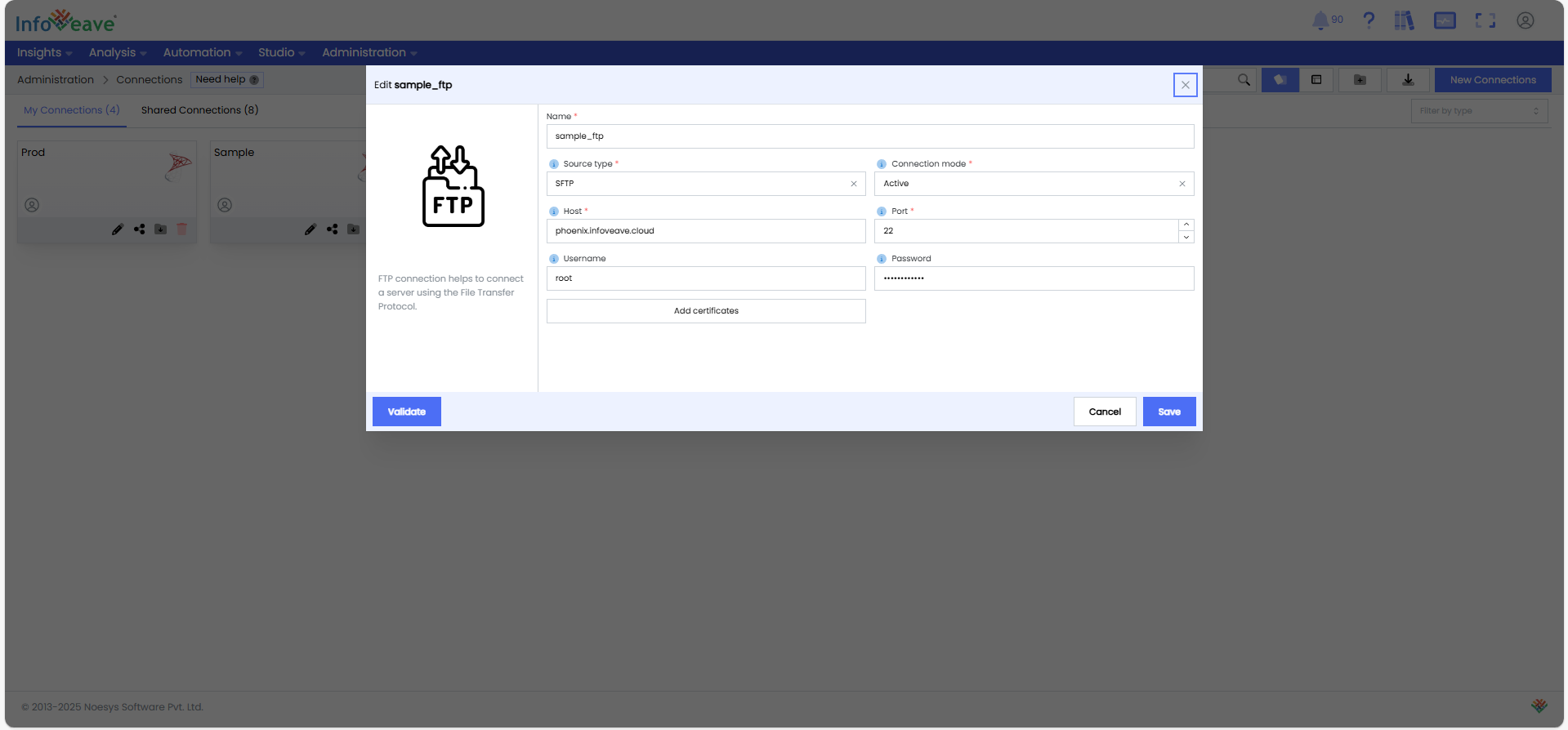
- Import Tables: Once the connection is established, import the required tables to make them available for processing in workflows.
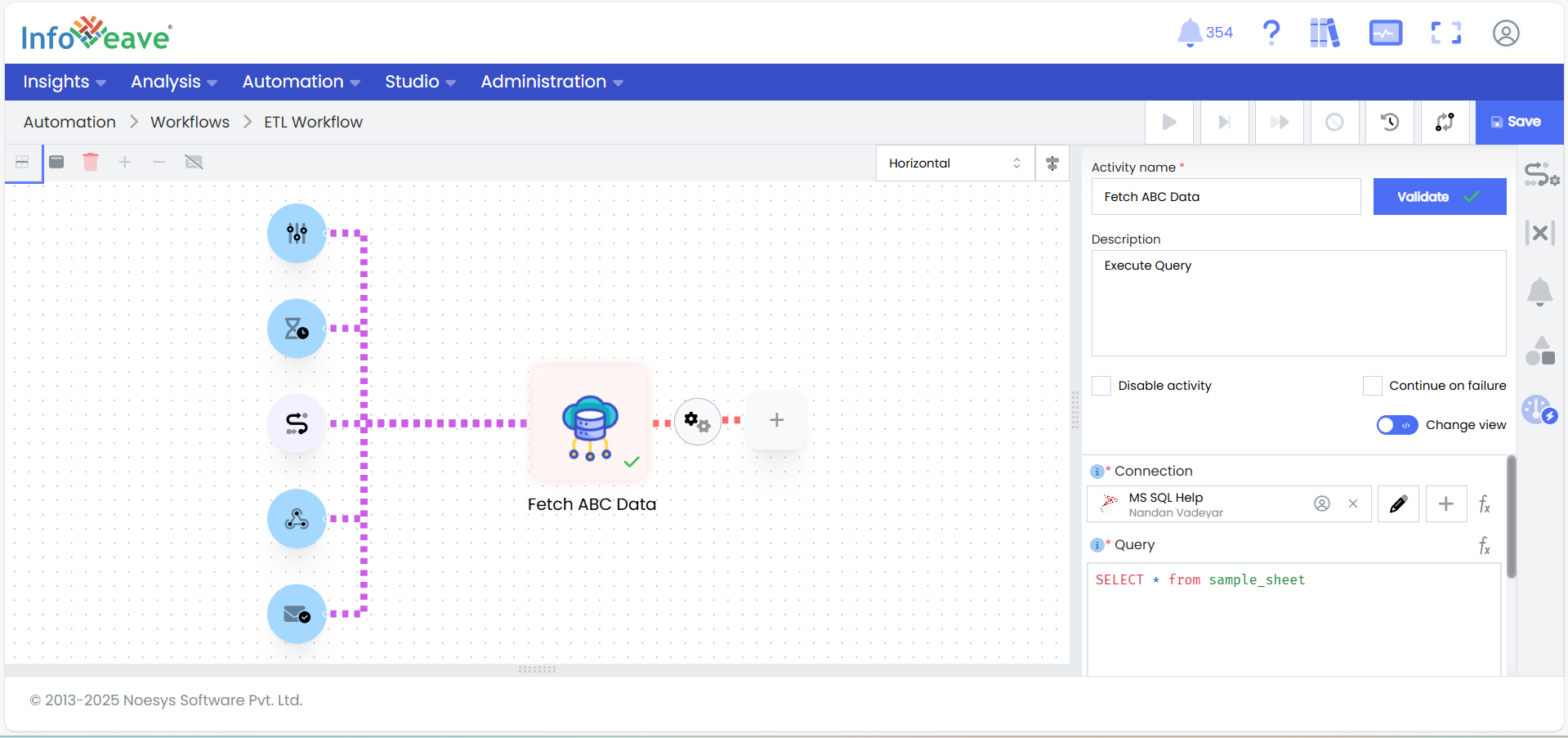
- Transform the ABC Bank Data
-
Clean the Data:
-
Remove Extra Characters: Use the transformation- Transform using Javascript to clean Loan_ID by removing trailing characters (e.g., regex LOAN[0-9]+).
-
Map Product IDs: Apply a mapping rule to convert product IDs (e.g., PROD001 → PRD_A) using the transformation- Static Lookup
-
Standardize Dates: Apply the activity Custom Date Format to convert date fields (e.g., Loan_Application_Date) to YYYY-MM-DD.
-
Round Numbers: Use the transformation Round Numbers to round numeric columns (e.g., Loan_Amount, Interest_Amount) to two decimal places.
-
Split Customer Names: Using the Split Column Transformation, split the Customer_Name column into First_Name and Last_Name for better usability.
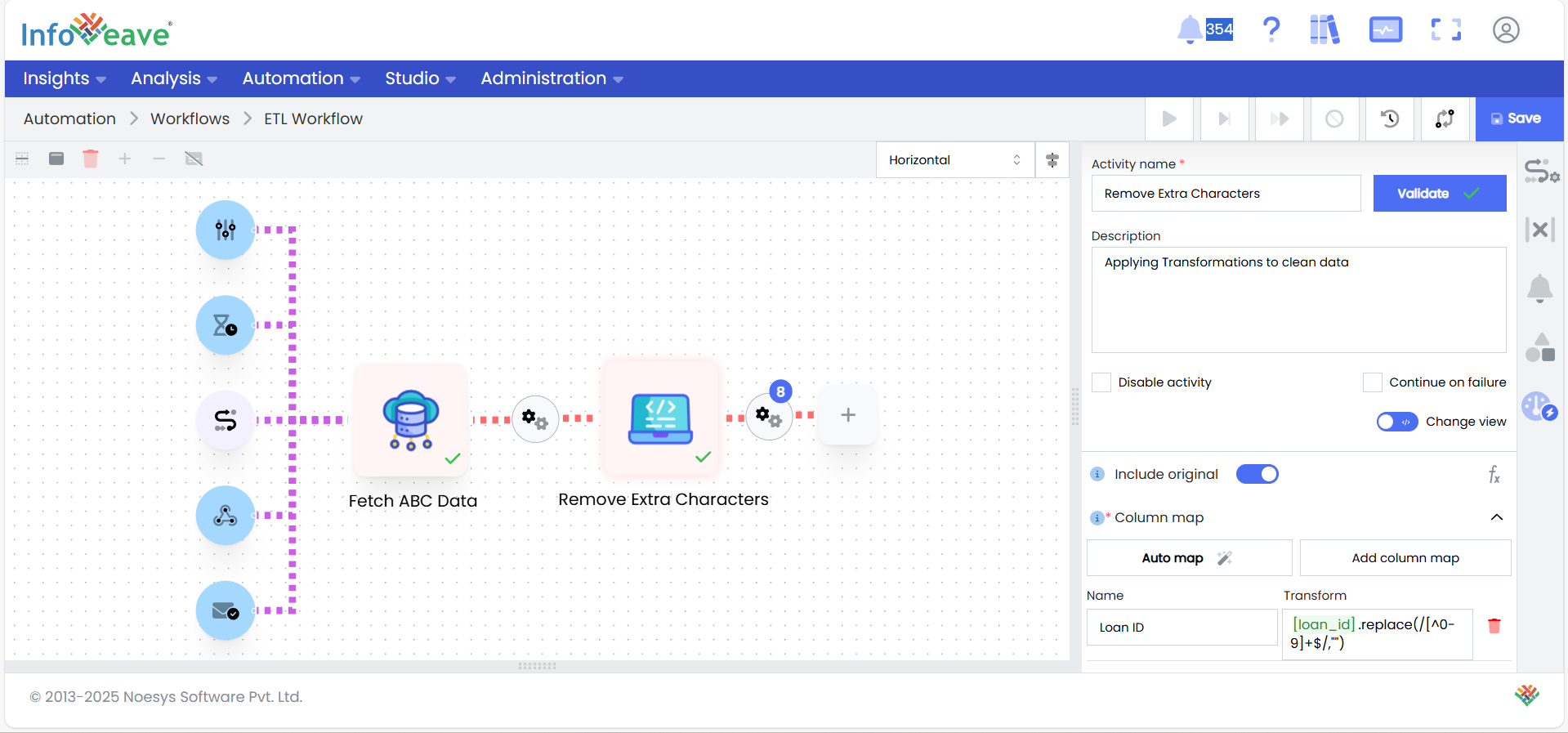
-
- Download from FTP and Read the Channel data
-
Download from FTP: Use this activity to download files for channels PVR Consultancy and Symmonds Agency
-
Read Excel Files: Use this activity to read the downloaded files for PVR Consultancy and Symmonds Agency
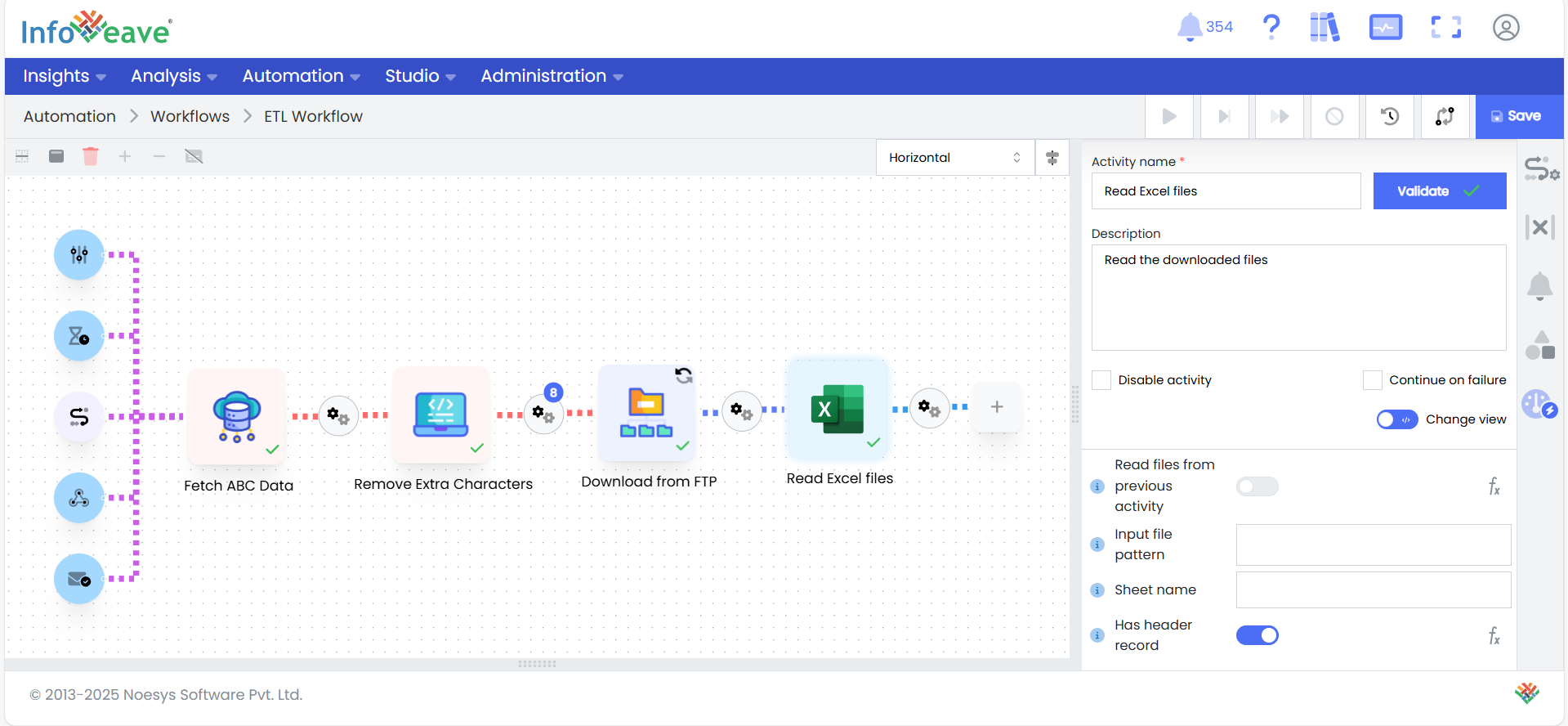
- Merge the downloaded FTP Files
-
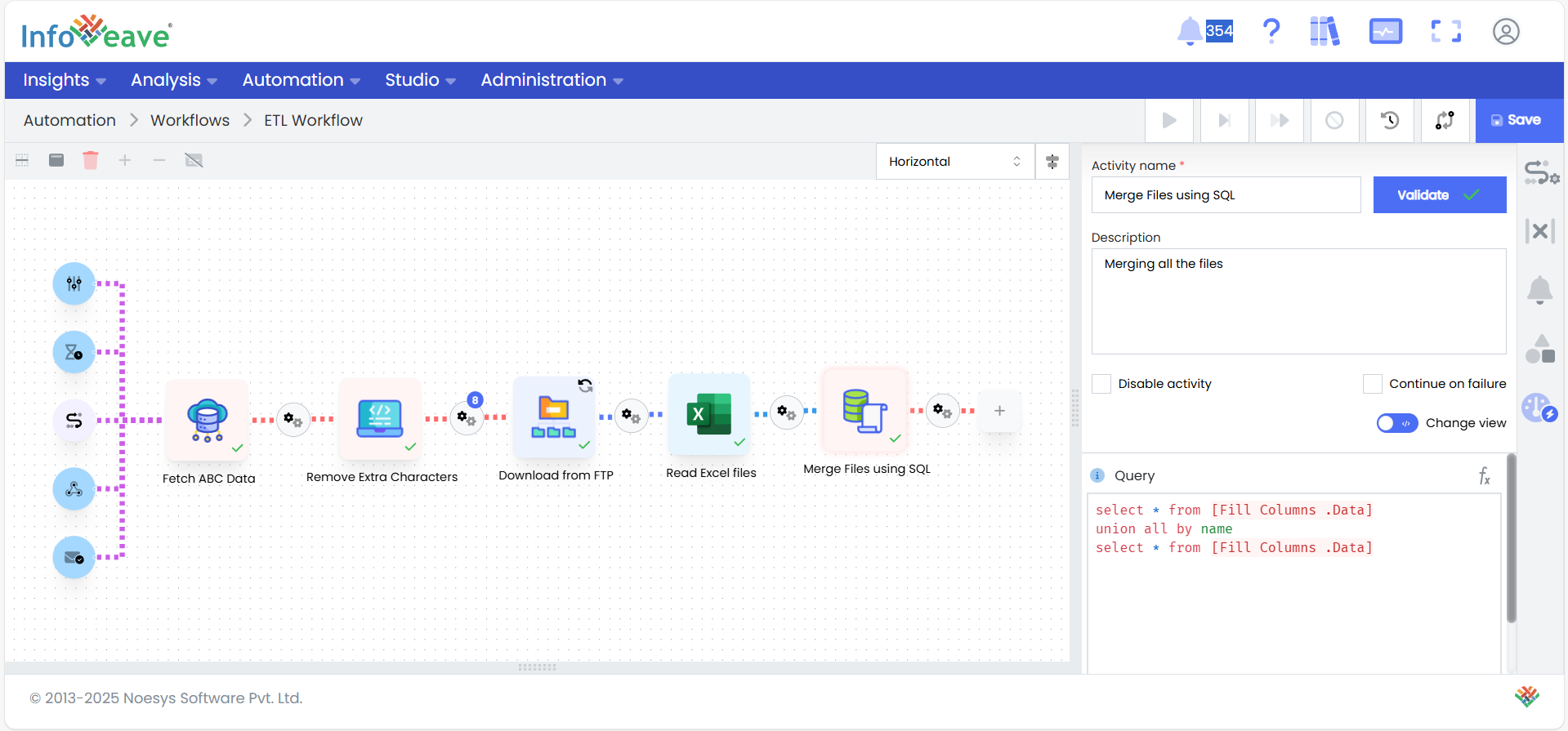
Combine Files: Use Infoveave’s Merge activity to merge the FTP datasets into a single file as they share the same table schema. Ensure that all columns are properly aligned and have consistent naming conventions.
-
Validate the Merged File: Perform a quick validation to ensure no schema mismatches or missing columns exist after the merge.
- Transform the merged Channel data
-
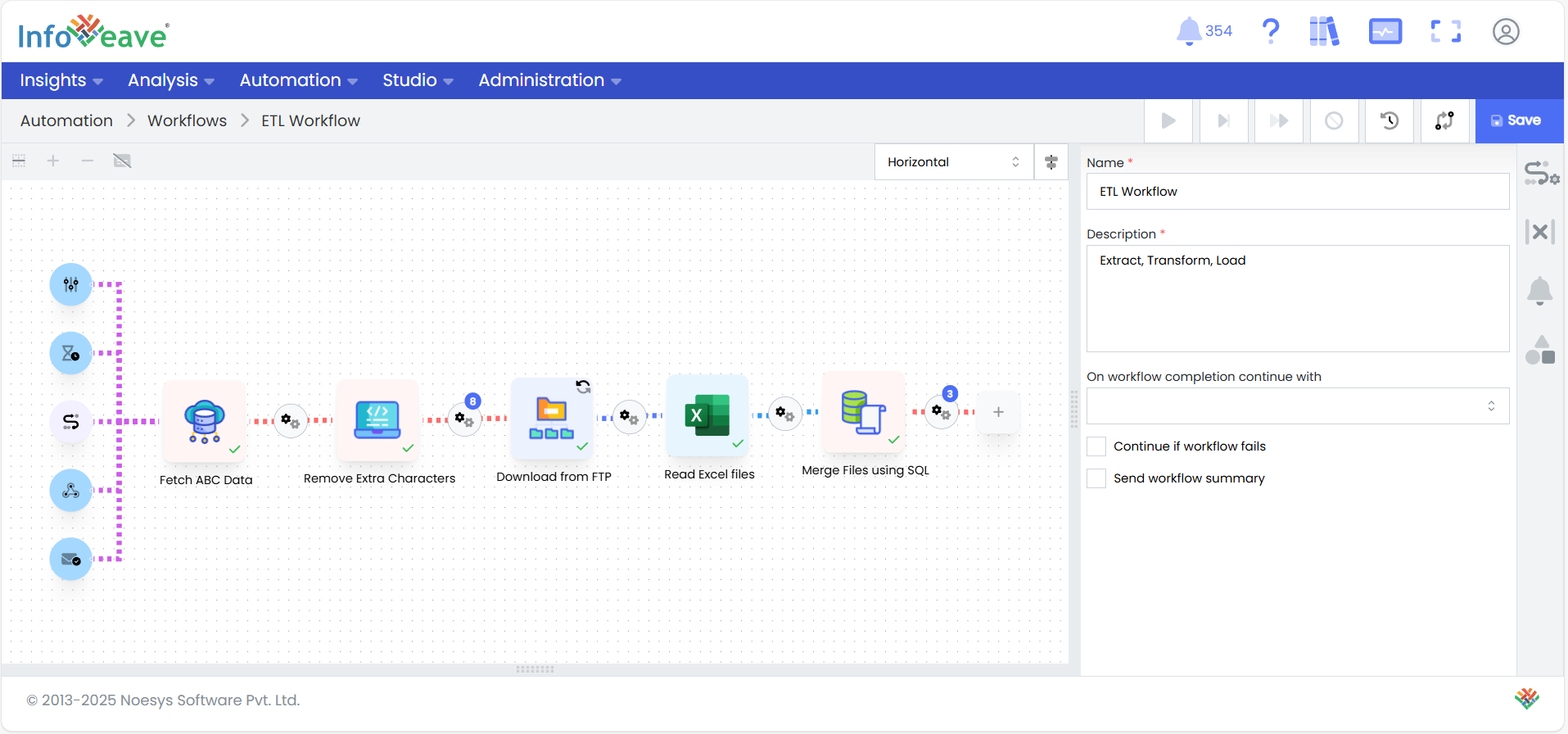
Handle Missing Data and Remove Duplicates: Fill missing values in critical fields, such as Applicant_Income, with the median value, using the transformation- Fill Columns. Apply a deduplication rule to remove duplicate records, ensuring each Loan_ID is unique.
-
Clean and Standardize Text: Remove special characters from text fields like Product_Name, and format First_Name and Last_Name by capitalizing the first letter, using the Transform using Javascript activity.
-
Format Numbers and Dates: Round numeric fields to two decimal places and standardize date columns to the YYYY-MM-DD format for consistency using the transformations- Round Numbers and Custom Date Format respectively.
- Merge and Load both the Bank and Channel data onto the Stage Table
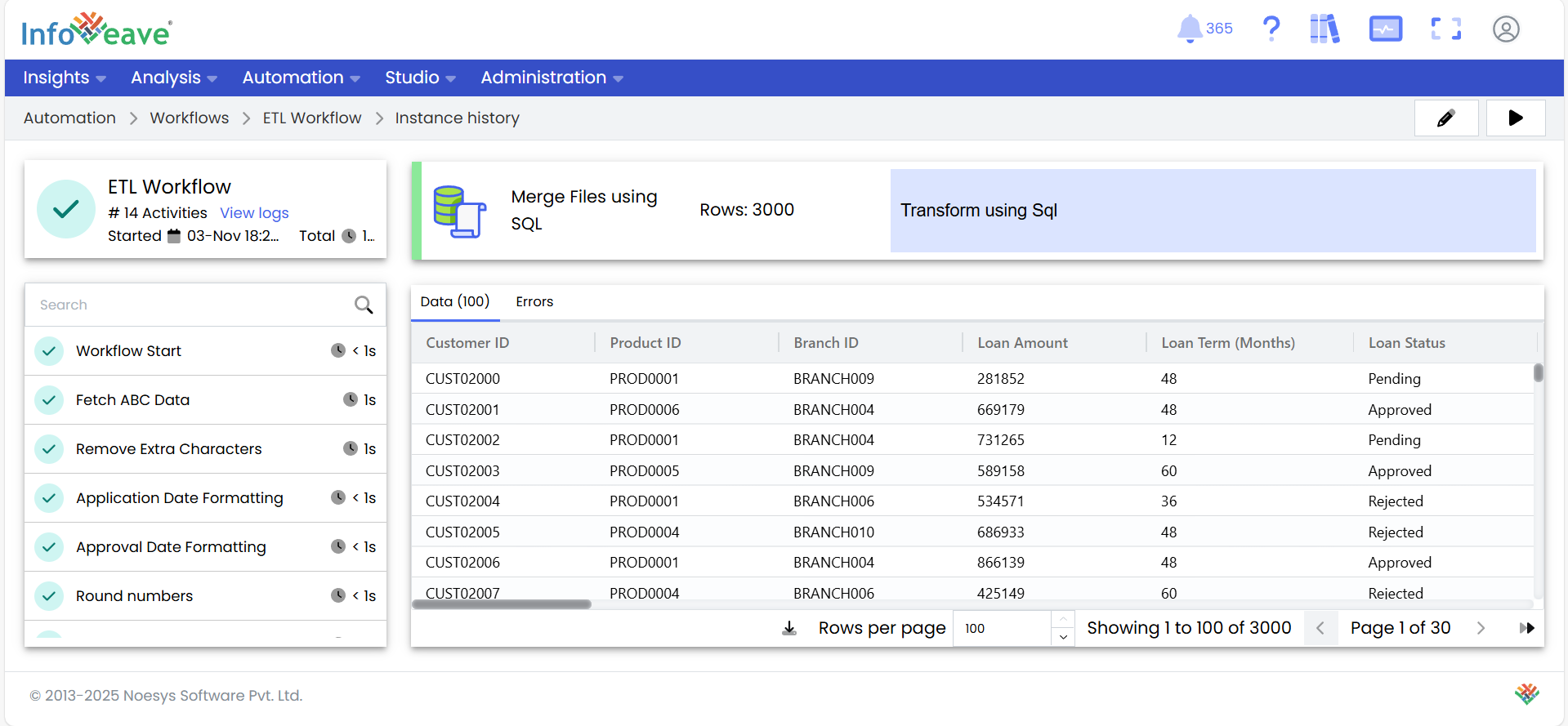
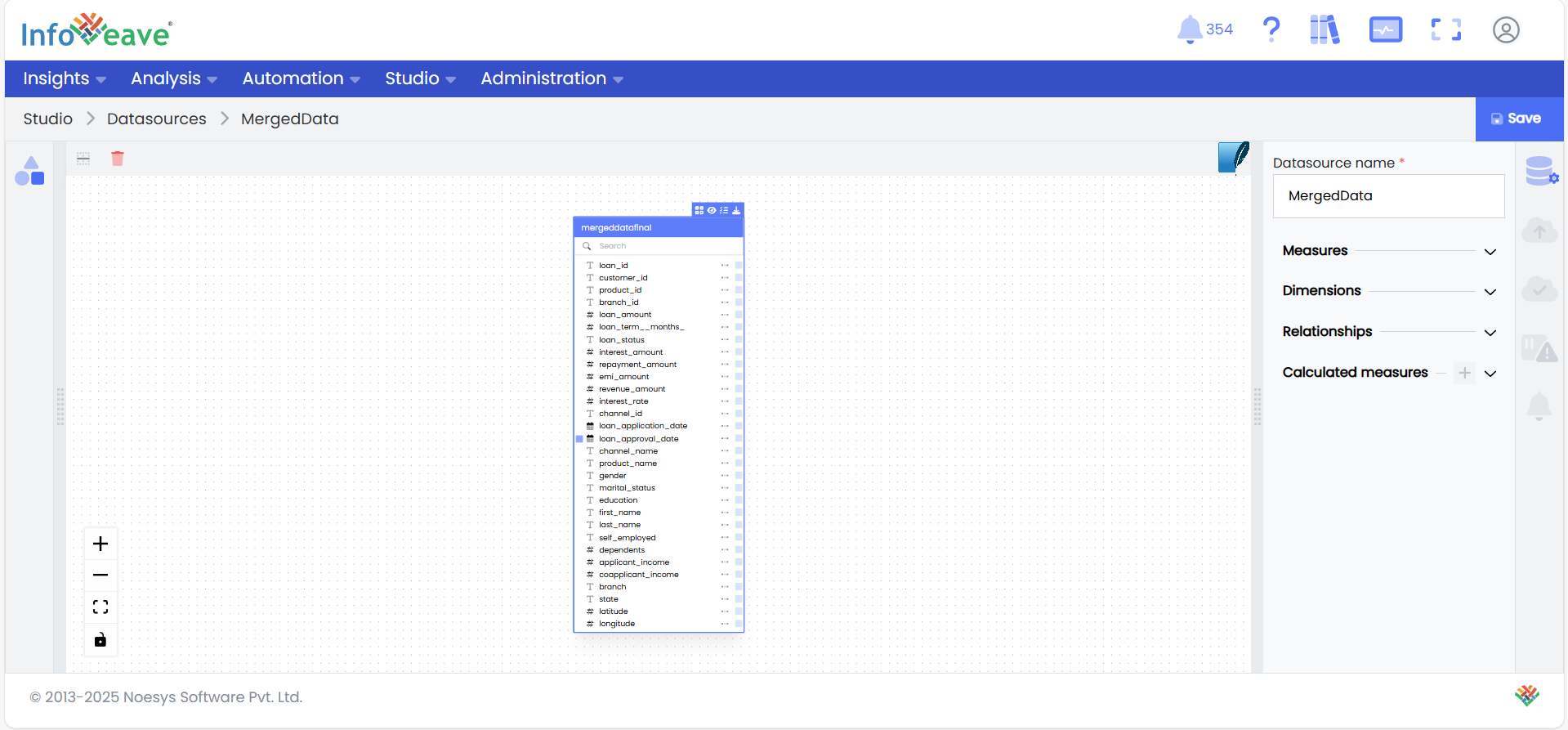
- Merge and Load Data: Combine transformed data from all sources into a single dataset using Infoveave’s Merge Activity. Validate the dataset, upload it to the Stage table using a Database Load Node, and verify consistency.
To learn more about Creating workflows, visit: Creating Workflow | Infoveave Help