
Types of Datasources
To fully harness the power of a data warehouse, organizations must integrate and manage data from a variety of sources. These include files, databases, documents, APIs, CRMs and more. In this section we will explore the types of data sources and their role in modern data management. Additionally, we will discuss how to handle data ingestion, the need for real-time and batch processing.
A Datasource is the origin or location where data is created, stored, or accessed. It acts as the starting point for data collection, from where raw information is ingested into a system for processing and analysis. They are an essential component in any data-driven system, as they provide the inputs that enable analytics, reporting, and decision-making. Datasources are the foundation blocks of any data management system. They enable organizations to:
- Ingest data from diverse systems for a data warehouse.
- Perform analytics to derive actionable insights and drive informed decision-making.
Datasources exist in multiple forms such as, structured databases, unstructured documents, streaming APIs or application logs. A few examples of Datasources are,
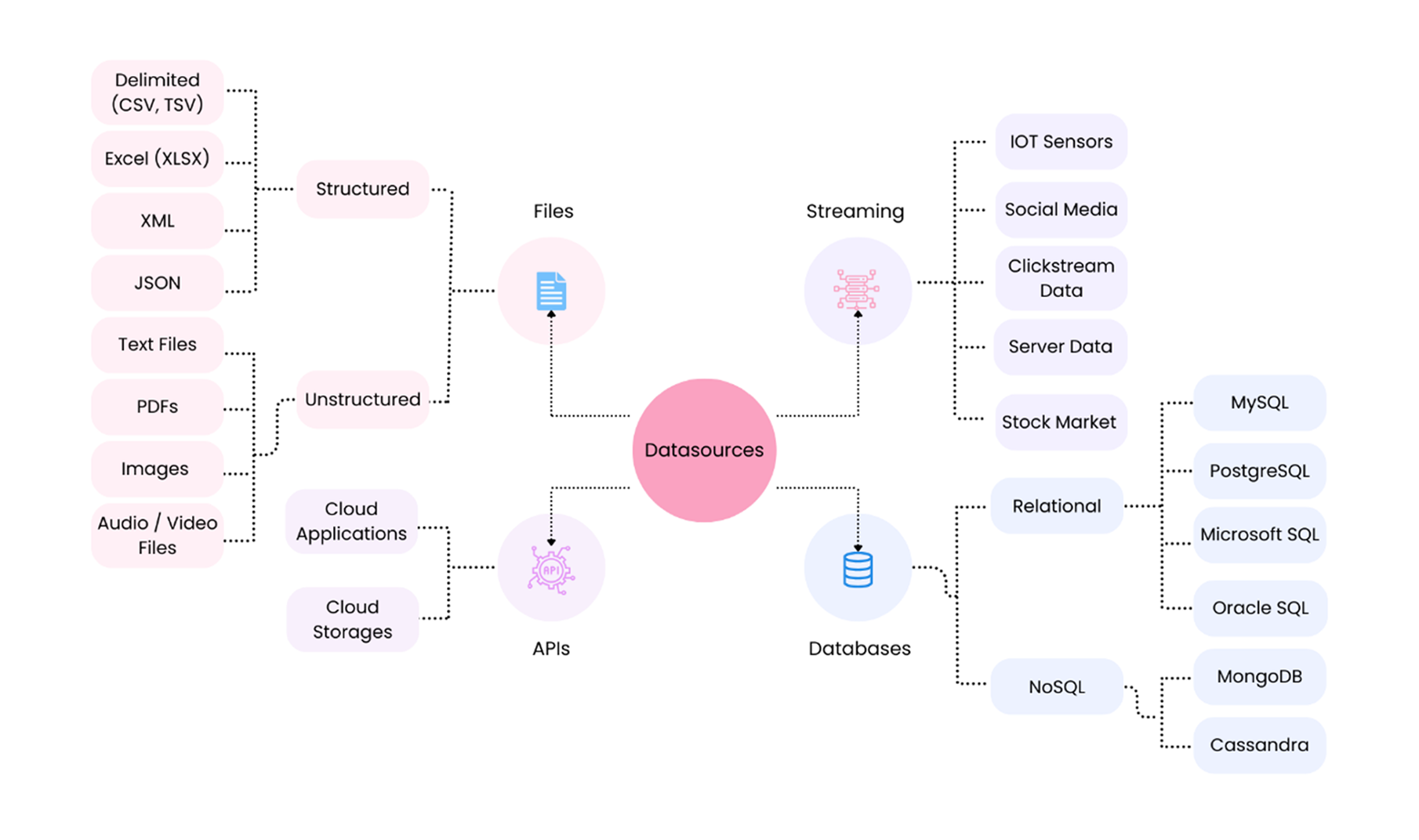
Given below are the key Datasource types and their relevance in a business context:
Files
Files are a widely used format for storing data. Common file types include CSV, Excel spreadsheets, JSON, and XML, that store structured or semi-structured data. Files also serve as input for advanced BI tools and are ideal for quick data exchange.
-
Delimited Files (CSV, TSV): Delimited files store tabular data separated by commas or tabs and are widely used for exchanging structured data.
Use Cases: Importing sales data into e-commerce databases or uploading financial reports into banking systems.
-
Excel Files (XLS/XLSX): Excel files are versatile for data analysis and small-scale storage with built-in tools for calculations and visualization.
Use Cases: Loading employee records into HR databases or importing budget plans into financial systems.
-
XML: XML organizes hierarchical data for web applications or software configuration.
Use Cases: Importing product catalogues into retail databases or transferring healthcare records to medical systems.
-
JSON: JSON is a lightweight format for exchanging semi-structured data, often used in APIs.
Use Cases: Saving API responses in NoSQL databases or storing real-time data logs for analytics.
-
Text Files: Text files store unstructured data like logs or plain text, suitable for quick data capture.
Use Cases: Saving server logs into monitoring databases or saving survey results for feedback systems.
-
PDFs: PDFs are used to share formatted documents like invoices, contracts, and reports.
Use Cases: Storing invoice data into accounting systems or storing metadata in document management systems.
-
Images: Images store visual data for media, AI, or marketing applications.
Use Cases: Storing image metadata in media libraries or linking image files to content management systems.
-
Audio/Video Files: Audio and video files store multimedia data for entertainment, education, or training.
Use Cases: Saving video metadata in streaming service databases or linking audio files to podcast platforms.
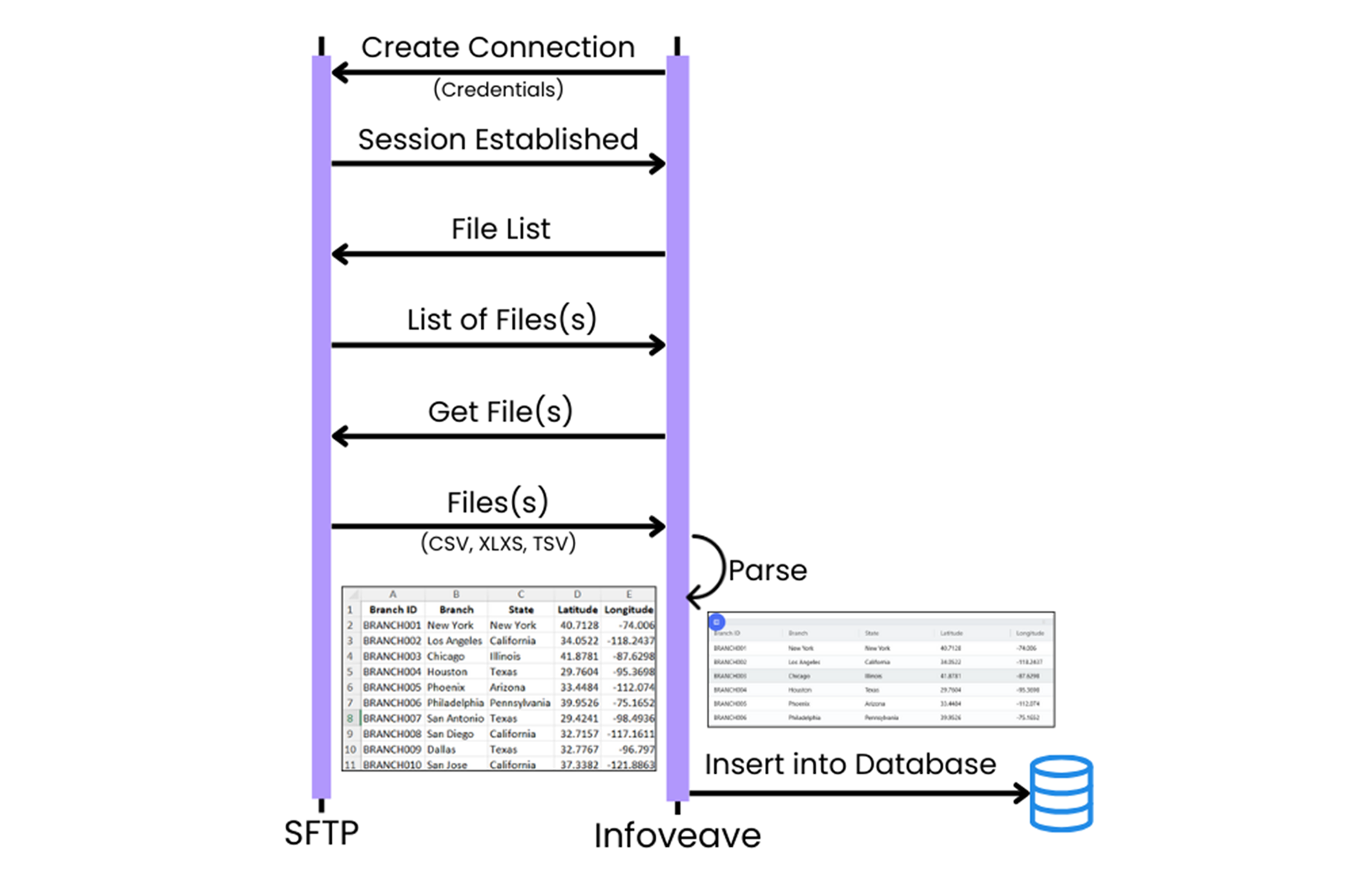
The above diagram shows the process for retrieving files from cloud-based file storage systems, processing them, and storing the resulting data in a database.
- Create Connection: A connection is established with the file storage system such as ???? using credentials.
- Session Established: The session is validated for interaction with the file system.
- File List: A list of files available in the storage system is retrieved.
- Get File(s): Specific files (e.g., CSV, XLSX) are selected and downloaded.
- Parse: The file content is parsed to extract tabular data.
- Insert to Database: The parsed data is stored in the destination database for further process.
Use Case: Downloading financial records from cloud storage, processing the data, and storing it in a database for accounting purposes.
Databases
A database is an organized collection of data stored and designed to be accessed, managed, and updated efficiently. Databases are mainly of two types: relational databases and NoSQL databases.
-
Relational databases store data in tables made up of rows and columns, with each table representing entities like customers or orders. These databases use SQL (Structured Query Language) to manage and query data. They are ideal for handling structured information, such as financial records, as they ensure data quality by maintaining relationships and enforcing constraints like foreign keys.
Use Cases: Managing customer orders in retail databases or storing transactions in banking systems.
-
NoSQL databases are flexible and can handle different types of data, such as documents, key-value pairs, graphs, and wide-column formats. They scale easily to manage large amounts of data and process them quickly. Their distributed design keeps them reliable and available, even if part of the system fails, making them a great choice for handling big data and dynamic applications.
Use Cases: Storing unstructured chat logs in customer support systems or saving large-scale IoT logs for real-time monitoring.
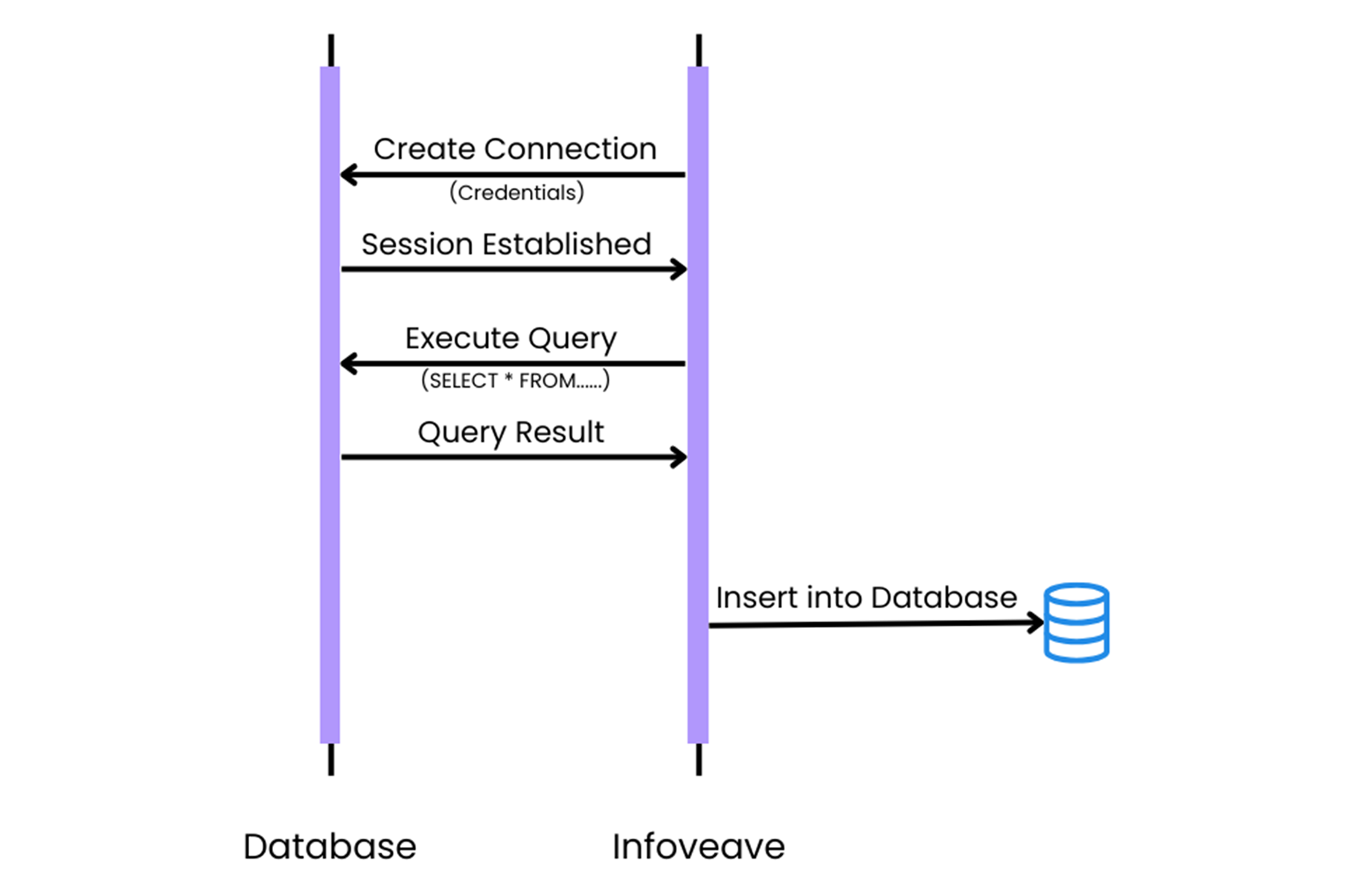
The above diagram image illustrates the process of querying a database directly using Infoveave.
- Create Connection: A connection is established to the database using credentials.
- Session Established: The database connection is verified, and the session is established.
- Execute Query: A query (e.g., SELECT * FROM loan_data) is executed to fetch or manipulate data.
- Query Result: The results of the query are retrieved.
- Insert to Database: The query results are by default in a tabular format and do not require any transformations. They can be loaded to the destination database for further processing.
Use Case: Extracting customer transaction data from a database, processing it, and inserting it into a destination database.
APIs
Application Programming Interfaces (APIs) are the bridges that allow businesses to fetch data from external systems in real-time. APIs come in various types, such as public APIs for services like Google Maps, private APIs for internal systems within organizations, partner APIs for business collaborations, and composite APIs that handle multiple requests at once.
To ingest data from an API, applications typically use GET or POST methods to request or send information. The GET method is used to request data from the API. On the other hand, the POST method sends data to the API. These interactions often use data in JSON (JavaScript Object Notation) format for exchanging data.
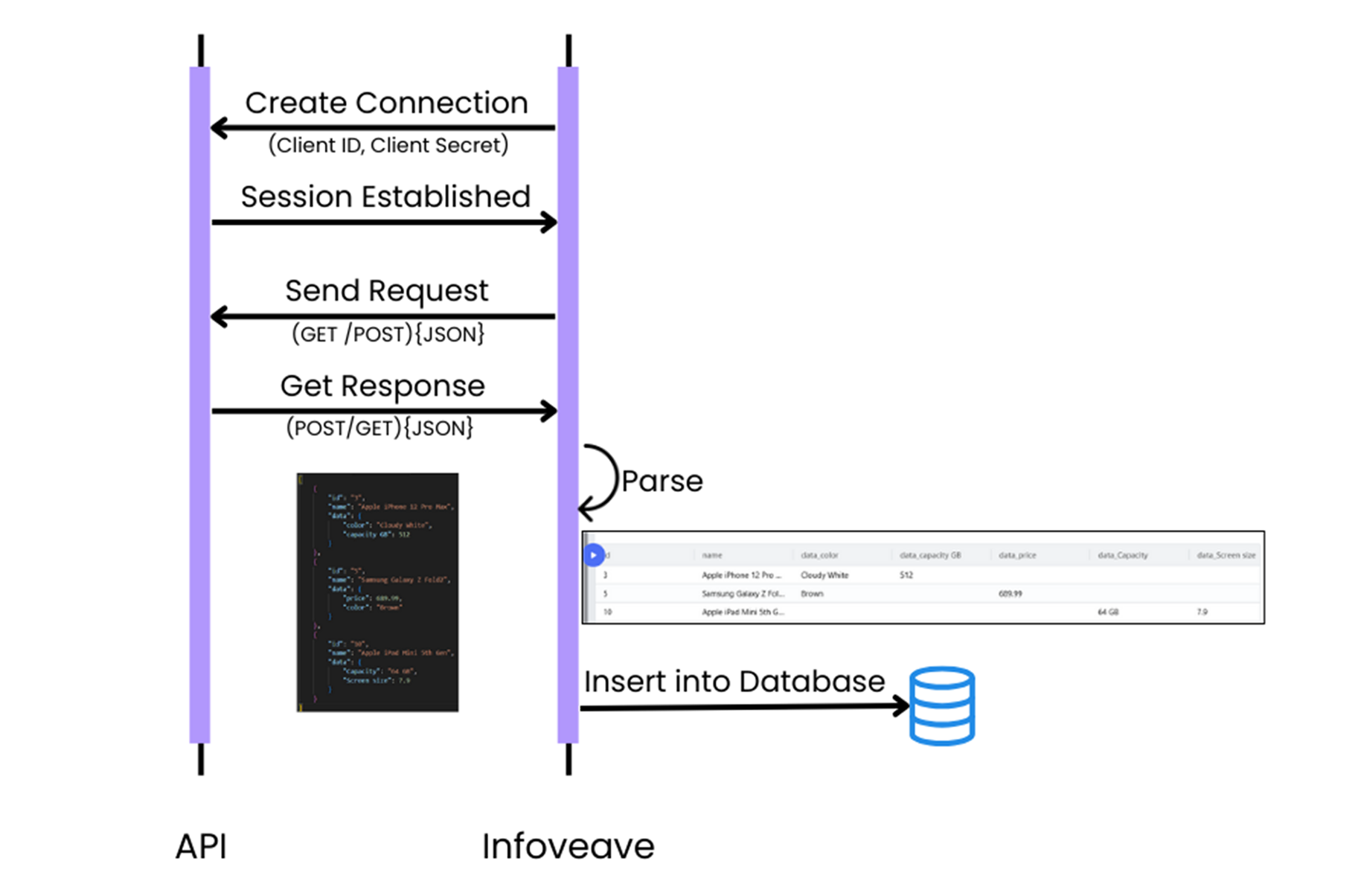
The above diagram demonstrates the process of integrating APIs with Infoveave to retrieve, parse, and store data in a database.
- Create Connection: A connection is established using credentials like Client ID and Client Secret.
- Session Established: The connection is validated, and a session is established to interact with the API.
- Send Request: Requests (e.g., GET or POST) are sent to the API, specifying the desired data format, usually JSON.
- Get Response: The API responds with the requested data in JSON format.
- Parse: The JSON response is parsed to extract into tabular format.
- Insert to Database: The parsed data stored in the destination database for further process.
Use Case: Fetching real-time data, such as product details or inventory, from an external API and storing it in a database.